EVM Safe in zkSync. Part I: Recreate Multisigs with EVM Interpreter
In recent years, there have been multiple stories about funds accidentally getting stuck in various zkSync networks; most of those stories relate to transferring funds to Safe (formerly known as Gnosis Safe) wallets. While L1 and L2 networks can have multi-signature safe replication options, it was impossible to recreate on the zkSync stack networks due to the differences between eraVM and EVM. However, the recent update (EVM Interpreter) now allows safe replication, and this article aims to share how the user can use it for fund retrieval.
This is part I of a two-part article series: the first guide will focus on recreating a safe, and the second one on transferring funds from an already created multisig. Both guides will present additional options that do not involve third-party backend/frontend services. However, they will require some technical knowledge.
Here is the breakdown of Part I:
- Why does it work now, but not before? — High-level explanation on changes included in the zkSync stack networks;
- Step 1: Safe Recreation with:
- Option 1: Protofire Safe [3] — easiest UX if both networks are supported
- Option 2: Safe Anywhere tool [4]— best for a broader range of networks
- Option 3: Metamask / Web3 Library — does not rely on any third party — usually caters to all networks that have canonical contracts
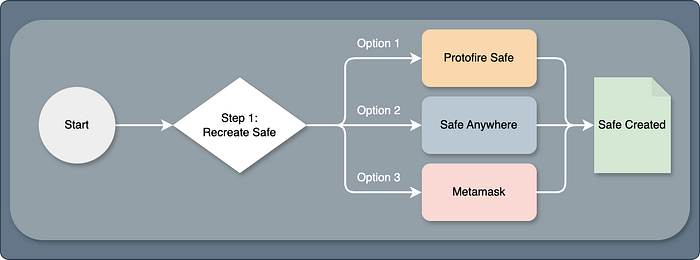
Choosing any option will have the same result
Note: If you are more interested in recreating safe and claiming lost funds rather than diving deeper into the solution, skip to the Step 1 section.
Why is it Possible Now?
To examine in more detail, multisignature wallets can be replicated if (and only if) the proxy address (1), init code (2), and salt (3) completely match. What zkSync did not have was a deployed proxy (1) with the same address as in other EVM networks. It stemmed from the absence of the main factories. The default “Arachind” and “Singleton” contracts (with the canonical address) were missing because of the differences between zkSync and the EVM. ZkSync documentation [1] explains it in more detail:
Since the bytecode differs from Ethereum as zkSync uses a modified version of the EVM, the address derived from the bytecode hash will also differ. This means that the same bytecode deployed on Ethereum and zkSync will have different addresses and the Ethereum address will still be available and unused on zkSync.
That led to a separate zkSync singleton factory and proxy factory creation; therefore, for years, safes across EVMs and zkSync could not be recreated:
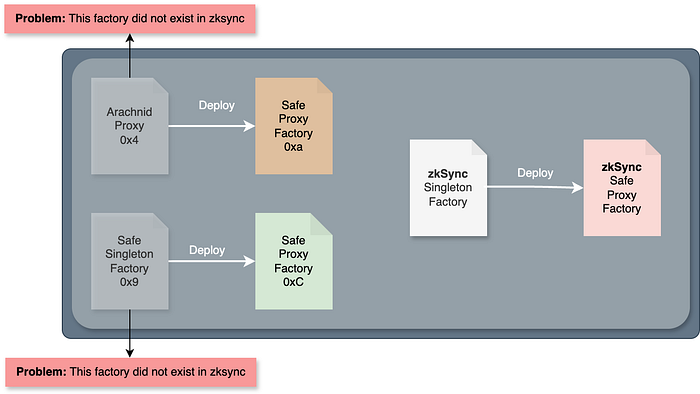
Safe recreation challenge: zkSync had different contract versions
However, in April of 2025, zkSync pushed an update: EVM Interpreter [2], which pre-deployed additional EVM contracts, two of them being:
- Arachnid Proxy:
0x4e59b44847b379578588920ca78fbf26c0b4956c
- Safe singleton factory:
0x914d7Fec6aaC8cd542e72Bca78B30650d45643d7
This allows the deployment of safe canonical contracts that were missing before. And good news — those contracts were recently deployed! (As of May 14th, there should be a full set of 1.3.0 and 1.4.1 zkSync Mainnet and Testnet contracts)
Now, users can recreate the same multisig and withdraw funds accidentally stuck in a contract, whose public key was derived from Ethereum (or any other EVM network). To show visually, users can now implement the same workflow across two networks:
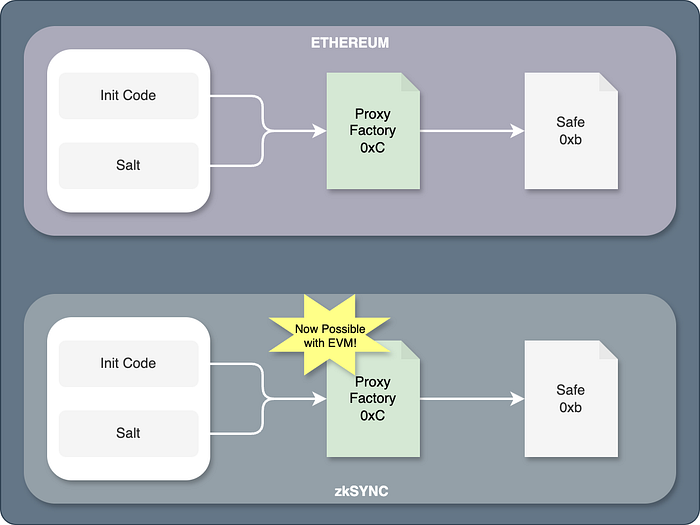
EVM Interpreter made it possible to recreate Ethereum’s Proxy Factory
- Gas limitations: transaction fees are significantly higher due to the requirement of real-time bytecode translation [2]; Therefore, it is advised to use this safe only for fund retrieval purposes.
- For day-to-day zkSync multisig usage, please visit the Official Safe [7].
- Delegate calls between EraVM and EVM contracts are unsupported; not all contract flows may work as expected.
- To ensure everything works well, try flows on testnets first (e.g., Sepolia and zkSync Testnet).
- Currently supported safes are from version 1.3.0 and higher.
- Safe will replicate only the setup data (if owners have changed in the source network, those changes won’t be replicated in the target one).
Step 1. Safe Recreation
In this section, three options for safe deployment will be presented. The first option will use the existing Protofire Safe [3], which supports multiple networks and allows safe recreation within the UI. The second option is using a separate recreation tool [4]. It is best for networks that are not supported within the same Safe UI Instance. The last option is doing it manually (using Metamask or Web3 libraries). It is a great solution if the user wants to recreate multisig without any intermediaries. All of those options will have the same result.
Option 1: Using the Protofire Multisig UI
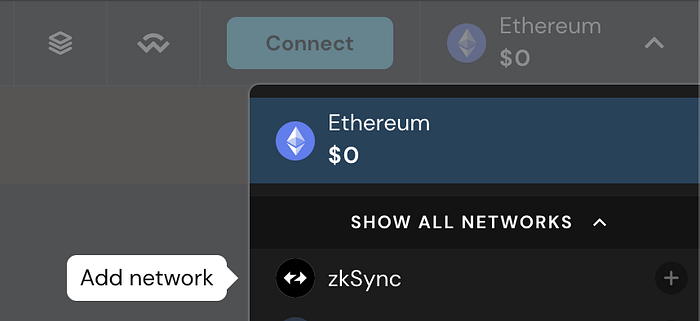
This is a straightforward approach — recreating a safe from the source network by selecting the desired target in a few clicks in Protofire Safe UI [3]. The upside of this approach is an easy and quick user experience. However, not all source or target networks are supported in the UI. In that scenario, please choose Options 2 or 3.
However, if desired networks are supported, the UI will guide the user through the deployment process. More about Multichain functionality is in this article [6]
Let’s go through the safe recreation scenario:
- The original Safe in Ethereum (1) version is 1.4.1 — example in the safe UI
- Target Safe Network: zkSync Mainnet (324)
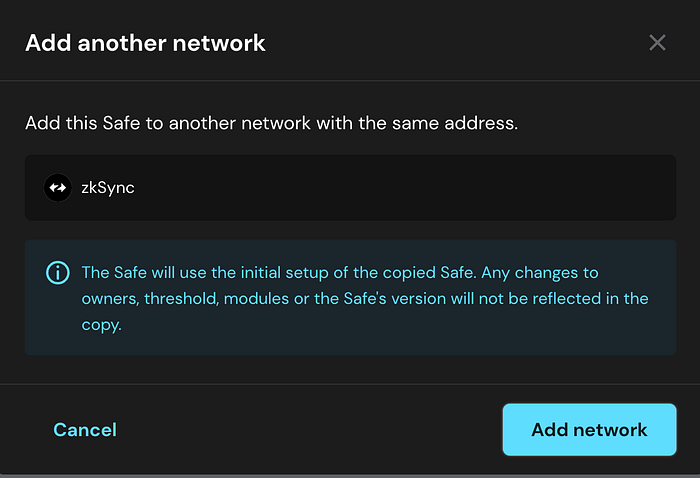
After adding the network, its creation data will be automatically copied and prepared for activation. Click the “Activate now” button to finish the transaction.
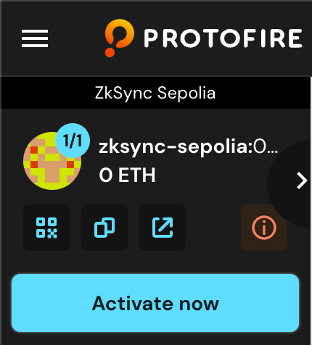
Activation button (zkSync Sepolia Example)
Follow the deployment instructions and see your safe in the Safe UI! Now the source and target networks have the multisignature wallet with the same address! You can also find it in Ethereum and zkSync explorers.
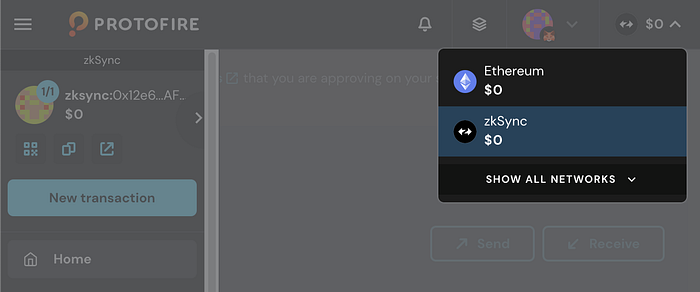
Safe with the same address in both Ethereum and zkSync
Note - Protofire Safe supports only EVM Equivalent contracts in zkSync and is intended for fund retrieval. For zkSync contract support, please visit the Official Safe [7].
Option 2: Using the Safe Anywhere Tool
The Safe Anywhere tool [3] was created to allow users to deploy multisigs when both networks are not supported within the same UI instance.
Note — if the chain does not exist in the chainlist, this tool may not work. In this case, please proceed to Option 3.
Let’s go through the safe recreation scenario:
- The original Safe in Polygon (137) version is 1.3.0 (L2).
- Target Safe Network: Abstract Testnet (11124) — based on a zkSync stack
Required Data:
- Safe Address:
0xb8DEEEC7c32a5c557Ca8A42d9dd522ED33918BA2
- Source and Target Chain ID: 137 and 11124
- Creation transaction. It can be retrieved from the explorer.
Let’s put it in the form:
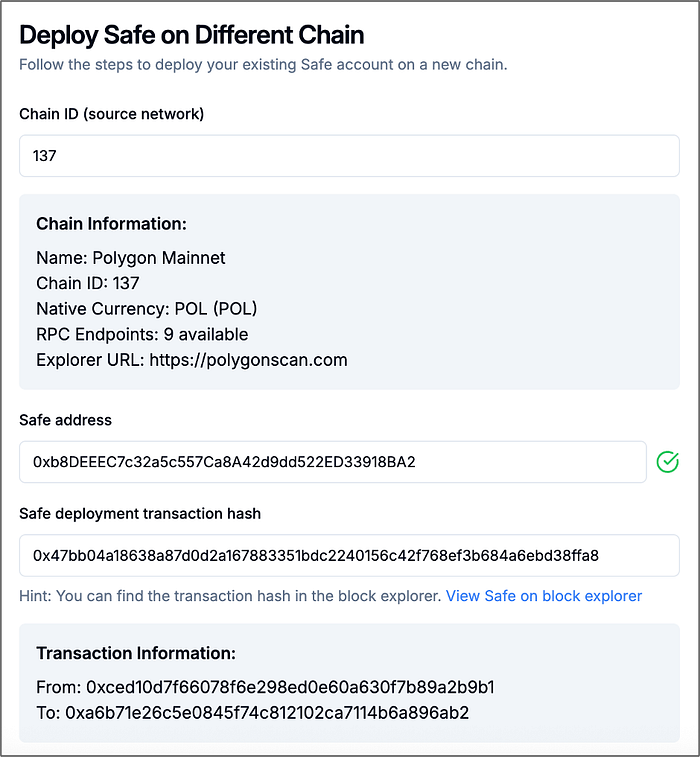
Source network data panel. Safe hash can be found on explorer
Users will see logs indicating whether the data fetching of the source network is successful.
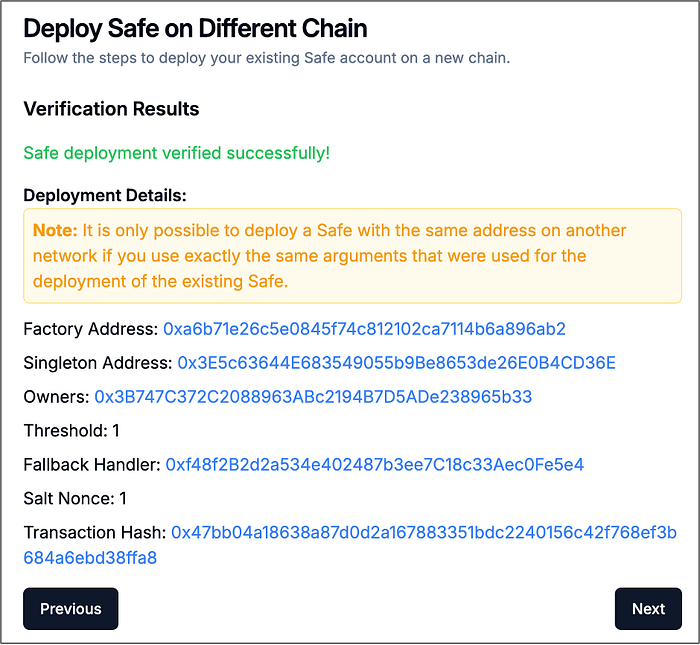
Fetched and verified source network data
Now goes the target network chainID (11124). If proxy factories exist in both networks, users will see confirmation and data for deployment.
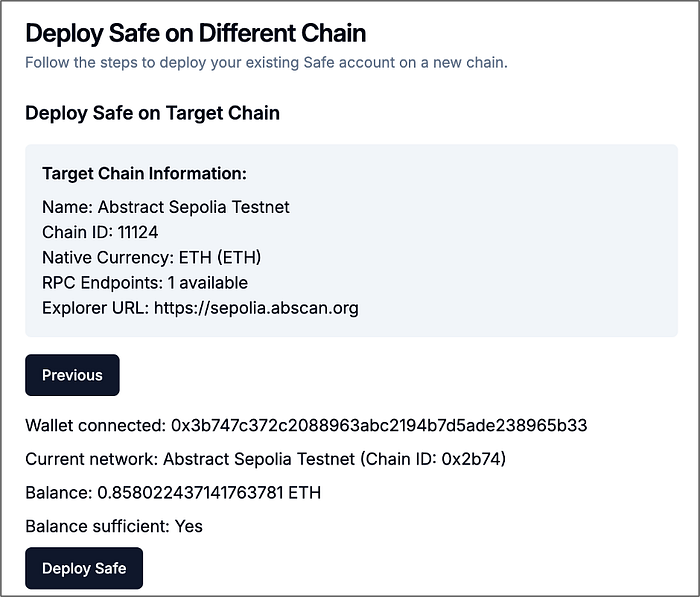
Target network information
After a successful deployment user is greeted with a confirmation message. Safe wallets can be found in both instances of the UI (the second multisig can be viewed in Abstract Dedicated Multisig Instance [5]).
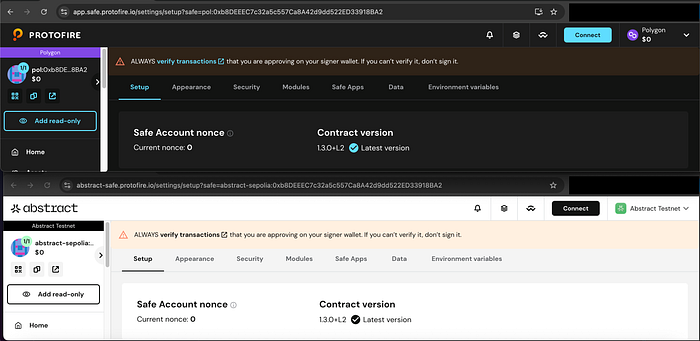
0xb8DEEEC7c32a5c557Ca8A42d9dd522ED33918BA2 recreated safe is available in Abstract testnet (zkSync Stack) and Polygon UI
Option 3: Metamask / Any Web3 Tool
This option is the most manual way to recreate the safe, but the good part — it does not depend on safe backend and frontend services (if the UI shuts down, it is still possible to replicate this option). Let’s go through the safe recreation scenario:
- The original Safe in Ethereum (1) is version 1.4.1.
- Safe address:
0x3b900d6c02ea8d7E4137778fab2629764332bA97
- Target Safe Network: Abstract Testnet (11124) — based on a zkSync stack
Step 1: Retrieve creation data from the creation transaction (in the explorer):
- To: proxy factory, which deploys the safe
- Input Data: the deployment data passed to the factory
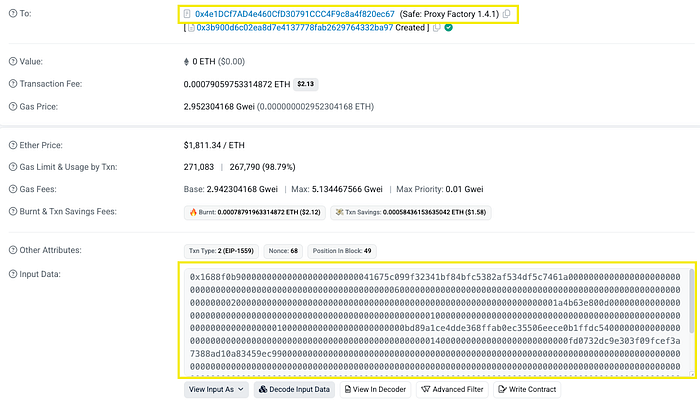
Step 2: Send 0 tokens to a proxy factory with hex data attached. It can be done via script or just with Metamask. For the latest option, enable hex data in advanced settings to pass the input data:
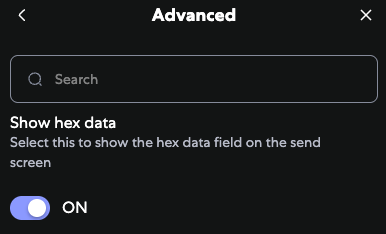
Enable hex data setting in Metamask
Now, switch to the target network and send data prepared in the first step:
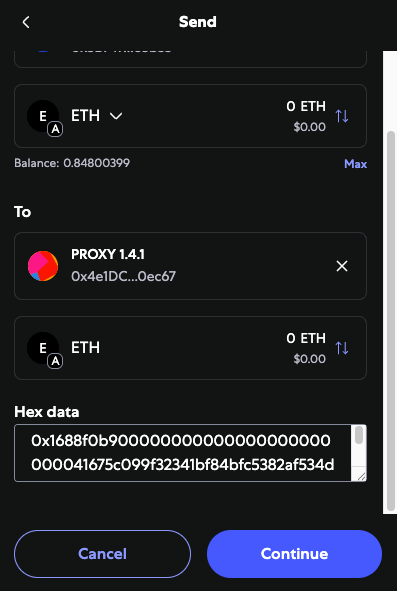
And the safe is created! In the activity tab, you should see that the transaction is an interaction with the contract.

The First Part is Done!
By now, you should have recreated the safe with the same address as the source network. Multiple options were provided to accommodate different scenarios. And a good thing — this approach works for most of the networks, not only zkSync!
If you plan to securely store your funds in a multisignature wallet and are not sure if the EVM network is supported, check out more about Protofire solutions! As an official Safe partner and Safe Guardian, Protofire ensures your treasury, protocol, or DAO is protected by infrastructure trusted by industry leaders.
- Explore the list of 100+ Safe deployments: https://safe.protofire.io/safes/
- Read more about safes and their extension/solutions: https://safe.protofire.io/
If you wish to learn how to retrieve funds (using UI or any option that does not involve third parties), stay tuned to Part II!
References
- EVM and zkSync Differences — https://docs.zksync.io/zksync-protocol/differences/evm-instructions
- EVM Bytecode Compatibility Is Now Live on ZKsync Era https://zksync.mirror.xyz/a_fFyNZJDa8Amuk9puDLVtKFbjQf8Ad1WuFWBx_tRVY
- Protofire Safe UI — https://app.safe.protofire.io/
- Safe Anywhere Tool — https://safe-anywhere.vercel.app/
By ElvisKrop — https://github.com/ElvisKrop
- Abstract Safe UI — https://safe.abs.xyz/
- Multichain Workflow — https://medium.com/protofire-blog/multi-chain-safe-in-the-superchain-933764cbe411
- Official Safe UI — https://app.safe.global
Share this article on
Share this article on